
Timesheet Improvements in the New Interface
We are proud to launch new improvements to our timesheet module. Over the past few years, we have received much feedback on improving our time management processes.
Here is a summary of them:
- When you submit your time to someone, we now record the user you selected. For reporting purposes, the “Submitted To” column can be chosen on your My Time and Time Approval panels.
- The “User Group” filter has been added to the Time Approval panel.
- You can now force the choice of an approver when the time is submitted. This particular option is set at the account level.
- Each user can select a default approver to ease the selection when submitting their time.
- An email notification can be sent to users who did not complete their timesheet properly: not fully submitted or not fully entered the minimum number of hours.
New “Submitted To” Column
When you submit your time to someone, […]
Introducing Project Portfolios in AceProject
After months of hard work, we are proud to introduce a new way of working with your projects: Project Portfolios.
A portfolio of projects should contain similar projects, sharing the same structure of assigned users, task statuses, groups, types, and priorities. In a portfolio, assigned users have the same access rights for all projects, except if you overwrite them at the project level. When you create a project, you must choose the portfolio to which it belongs.
- Example: Let’s say you have ten marketing projects; then you should group them into a Marketing Portfolio to ensure all marketing projects have the same structure. This will allow you to display all tasks from your marketing portfolio in one click. Soon, we plan to enable you to move a task from one project to another in the same portfolio in a single click and to activate the Board view for all projects from a portfolio.
- Before the Portfolios: Previously, you had parent and child projects with dynamic and static templates. That concept has been deprecated and replaced with […]
Administration Panels Complete in the New Interface
We proudly announce that we made great progress in the new interface. We have completed all project, user, and account management panels. Please login to the New Interface and give it a try.
Here is the list of things you can now do:
- Add a user to your account;
- Modify any user preferences or your own profile (including your password);
- Open a user list panel to see all users;
- Assign a user to a project with proper access rights;
- Assign a project to a user with proper access rights;
- Modify your account preferences;
How to add a user to your account?
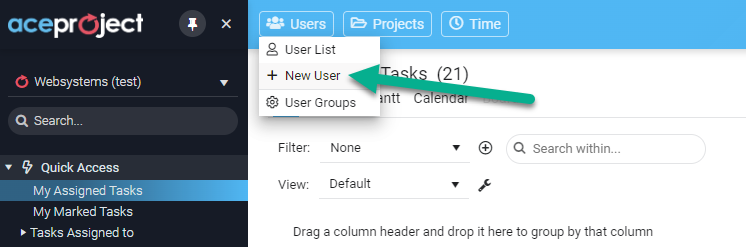
Simply click the “New User” menu item at the screen’s top upper left: see the image below. A panel will appear to enter the new user credentials, access rights, email notifications, and other settings.
Introducing the User List Panel in the New Interface
Before the end of the year, we are glad to launch our latest release of 2022, which includes a new user list panel for AceProject. The next iteration of that panel will allow you to edit the settings for each user, including their project access rights.
How to open the User List Panel?
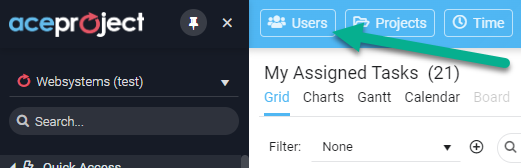
Simply click the “Users” button at the screen’s top upper left: see the image below. Proper access rights are needed: administrators will see all users with all fields (27), while regular users will see a limited number of fields (9).
What columns are available in the user panel view?
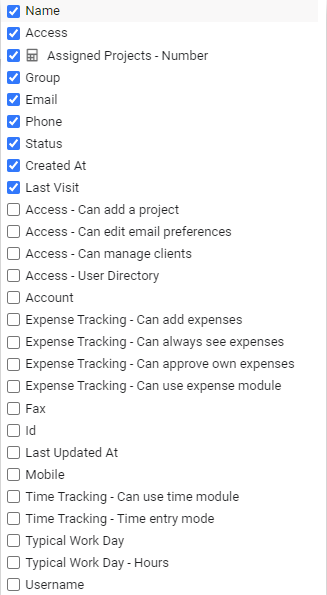
The user panel allows you to add/remove the columns in the grid by simply clicking the 3-dot menu from any column. You can choose from 27 columns:
How to use the User List panel?
The User List panel offers a lot of flexibility. By default, you see all active users in your account. You can […]
New Time and Project Features in the New Interface
Good News! We just rolled out many new features in the New Interface. When you create a new project from a template, we added some options to also copy tasks and documents.
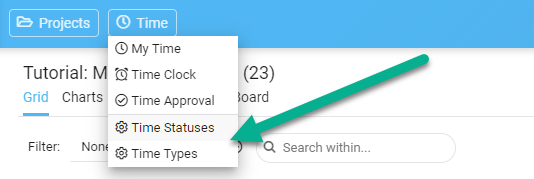
An administrator can now manage time types and time statuses without going to the classic interface anymore.
Finally, you can see your deleted projects directly from the Project List panel, and restore them easily within the 30-day grace period.
How to use the Copy Project Options?
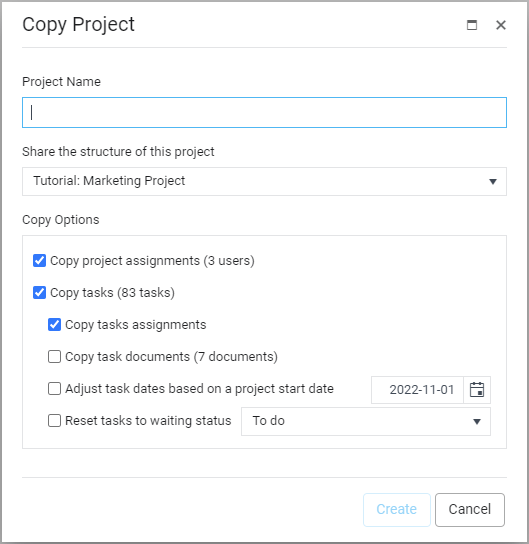
When you create a new project, you have to select a template project to share the structure with. Once the template project is selected, you now have some copy options available below.
How to manage your Time Types and Time Statuses?
Simply click the “Time” button located at the top upper left of the screen, and choose the option your want. You have to be an administrator to access this feature.
How to modify your […]
Introducing Project List in the New Interface
The new interface is still evolving with a panel displaying the list of your projects. This new panel displays all your projects in a comprehensive grid, allowing you to filter, sort, and group your projects with multiple criteria.
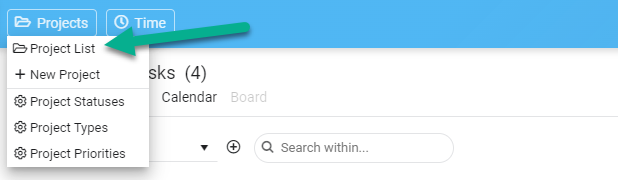
How to open the Project List?
Simply by using the “Projects” button located at the top upper left of the screen, and click the “Project List” item. See the image below:
How to use the Project List panel?
The Project List panel offers a lot of flexibility. First, you see the projects you are assigned to if you are a normal user, and all projects if you are an administrator. If you click any project, it will open the Edit Project panel and allow you to do some modifications.
Moreover, you have the following options available:
#1 Grouping: This feature allows you to group your projects on one or several levels. For example, you can group your projects by Status, then by Type. To activate this feature, simply drag-drop a column above the […]
10 Reasons why a PMP certification is still important

Project Management Professional (PMP) certification remains one of the most prestigious and widely recognized credentials in project management. Despite the emergence of new methodologies and technologies, the importance of PMP certification continues to hold firm. Here are ten reasons why obtaining a PMP certification is still a valuable investment for professionals looking to enhance their careers in project management.
1. Global Recognition
The PMP certification is recognized and respected worldwide. It represents a standard of competence that employers worldwide acknowledge and seek in potential employees. A PMP certification can significantly increase your job opportunities, as it is universally accepted proof of your project management skills and knowledge.
Example: Maria, a project manager from Spain, successfully applied for a project management position in a large tech firm in Canada. Her PMP certification was crucial in demonstrating her credentials during the application process, as the Canadian company readily recognized it despite her […]
5 Ways AI and Automation Are Transforming Project Management
In today’s rapidly evolving business landscape, the increasing use of artificial intelligence (AI) and automation is reshaping traditional project management practices across many industries. Recognizing the significance of these technological advancements is crucial for professionals navigating the dynamic field of project management.
We will examine five key ways that artificial intelligence and automation are transforming project management to highlight their significance and the revolutionary effects they are having.
1) Streamlined Task Allocation and Resource Management
Integrating AI-driven tools has led to significant advancements in task allocation and resource management in modern project management. These tools leverage AI algorithms to automate task assignments, considering team members’ specific skills and availability. By intelligently matching tasks with individuals possessing the requisite expertise and considering their current workload, project managers can ensure optimal resource utilization and minimize potential bottlenecks or delays.
Predictive analytics are pivotal in enhancing resource management by forecasting demand and optimizing resource allocation. […]
Project Management for Students
Have you ever got an excellent project idea but didn’t know where to begin? Or perhaps you’ve started a project but found it challenging to stay organized and on track? If so, you’re not alone.
Managing a project can be daunting, especially for students juggling many things simultaneously. Imagine you must deal with coursework, extracurricular activities, and personal life. However, with the right approach and mindset, students can master project management and turn their ideas into reality. Let’s find out how it works.
In this article, we will provide a step-by-step guide to student project management, including:
- Common challenges
- Key steps
- Tools and resources
- Tips for success
But first, let’s discuss how to find time for project management if you are overloaded with essay assignments.
Useful Tools and Resources
There are many tools and resources available for students to improve their skills. Some popular tools include Trello, Asana, and Google Docs. These tools can help students manage tasks, collaborate with team members, and track progress. Resources such as books, online courses, and […]
The Next Big Trends in Project Management Software
 In the dynamic world of project management, staying ahead of the curve is crucial. As we look into the future, it’s evident that project management software will continue to evolve, revolutionizing the way teams collaborate and manage their work.
This article will explore potential trends in project management tools and their implications for the workplace, including real-life examples of how businesses can harness these innovations.
1. Integration of Artificial Intelligence and Machine Learning
One of the most significant trends in project management software is the integration of Artificial Intelligence (AI) and Machine Learning (ML). These technologies are set to transform project management by automating routine tasks, predicting project outcomes, and providing data-driven insights. For instance, AI can analyze past project data to forecast timelines, identify risks, and suggest optimal resource allocation. Imagine a software that tracks your project’s progress, predicts potential hurdles, and recommends corrective actions.
Real-Life Application: Consider a software development company that uses an AI-enhanced project management tool. This tool could analyze past projects to predict the time required […]
Top 5 Pros and Cons of CRM Software for Recruiters
 In the competitive world of recruitment, Customer Relationship Management (CRM) software has become a pivotal tool for managing interactions with candidates and clients. While CRM software offers numerous benefits to recruiters, drawbacks are also worth considering. This article explores the pros and cons of using CRM software for recruitment.
The adoption of CRM technology in recruitment reflects the broader digital transformation in the HR industry, aiming to streamline processes and improve outcomes. As the recruitment landscape continues to evolve, understanding the impact of CRM software is crucial for agencies looking to stay ahead of the curve. Balancing technology with human insight, recruiters can harness the full potential of CRM to enhance their operations while navigating its challenges.
★ If you want robust pm software with your CRM software to manage your projects better, consider our tool AceProject. Our pricing is not based on the number of users, which can save you a lot of money.
CRM Software for Recruiters: Top 5 Pros & Advantages
Zendesk Software: Top 10 Cons & Disadvantages

Zendesk Software is popular for businesses seeking to streamline their customer service operations. However, like any tool, it has its drawbacks. In this article, we explore the top 10 cons and disadvantages of using Zendesk, shedding light on aspects that could negatively impact your business operations and customer satisfaction. While Zendesk has been celebrated for its ease of use and comprehensive service offerings, potential users must consider the whole picture, including the less favorable aspects.
These drawbacks range from difficulties tracking and organizing customer interactions to limitations in customization and reporting capabilities. Understanding these challenges is crucial for businesses to decide whether Zendesk aligns with their customer service goals and operational needs.
★ If you are looking for robust pm software to better manage your projects, consider our tool AceProject. Our pricing is not based on the number of users, which can save you a lot of money.
Top 10 Drawbacks & Disadvantages of Using Zendesk Software
Diving into the specific drawbacks of Zendesk reveals a range […]
 In project management, the significance of effective communication cannot be overstated. However, when communication falls short, the impact can be detrimental to the success of any project. This article explores the top 10 disadvantages of poor communication in project management, highlighting why this aspect should never be overlooked.
10 Advantages of Managing your Projects with Excel
 In the dynamic arena of project management, selecting the right tools is crucial to ensure success and efficiency. Microsoft Excel, a mainstay in spreadsheet software, is more than just a tool for calculations and data entry; it has evolved into a robust and versatile platform ideal for managing various projects. Despite the proliferation of specialized project management software, Excel’s enduring popularity is a testament to its adaptability and effectiveness across multiple project scenarios.
This adaptability stems from Excel’s blend of simplicity and advanced features, accommodating novice users and data analysis experts. It bridges basic task management and complex project planning, making it a universally accessible tool. This article delves into ten significant pros & advantages of using Excel for project management, highlighting how it seamlessly integrates into different work environments and caters to diverse project needs.
 Instead of using Excel to manage your projects, try our tool